Here’s a stat that might make you pause before you hit “submit” on your next job application: roughly 75% of resumes never make it to a human pair of eyes. Not because the candidates aren’t qualified. Not because the roles have been filled. But because a piece of software decided their resumes didn’t make the cut.
Welcome to the world of Applicant Tracking Systems or ATS; the digital gatekeepers that stand between your resume and the recruiter’s desk.
Now, before you start thinking of the ATS as some cold, heartless robot out to crush your dreams, let’s reframe things. An ATS isn’t just a filter. Think of it more like a database combined with a search engine. Companies use it to collect, organize, store, and rank resumes based on how closely they match a given job description. When a recruiter opens their dashboard, they’re essentially searching for the best match, kind of like how you’d search Google for the best pizza place nearby.
And that brings us to the single most important shift you need to make in your thinking: stop trying to “beat” the ATS, and start thinking about how to optimize for it. This isn’t about gaming a bot. It’s about presenting your skills, experience, and qualifications in a language the system and eventually, the human behind it, can clearly understand.
That language? Keywords.
This guide is going to walk you through exactly how to find the right keywords, where to put them, how to avoid common traps, and how to test your resume before you send it off into the digital void. If you’re serious about landing more interviews, this is the deep dive you need.
For a broader overview of structuring your CV for these systems, you might want to start with our guide on how to create an ATS-friendly CV.
How ATS Software Actually “Reads” Your Resume?
Before you can optimize for a system, you need to understand how it works. So let’s pop the hood.
When you upload your resume, whether it’s a PDF or a Word document, the ATS doesn’t “see” it the way you do. It doesn’t admire your clean layout or your tasteful font choices. Instead, it runs your file through a process called parsing. Parsing essentially strips your document down to its bones, converting all that beautifully formatted content into a plain-text profile that the software can read, categorize, and store.
This parsed profile is where things get interesting. The system takes your information and tries to slot it into predefined fields: name, contact information, work history, education, skills. If your formatting is too creative, think fancy columns, images, or text boxes; the parser can get confused, and your data ends up jumbled or missing entirely.
Once your profile is parsed, the ATS often runs it through what are called “knockout questions.” These are the non-negotiable requirements things like “Do you have a valid driver’s license?” or “Do you have 5+ years of project management experience?” If you don’t meet these minimums, you’re out before the real evaluation even begins.
For resumes that survive the knockout round, the ATS moves to ranking and scoring. It compares the content of your resume against the job description and assigns a percentage match. The higher your score, the higher you appear on the recruiter’s list. And here’s the thing: recruiters are busy. They’re often only looking at the top 10 or 20 results. So if your score is sitting at 40% instead of 85%, you’re essentially invisible.
Understanding the difference between resume score and ATS score can help you pinpoint exactly where your resume falls short in this ranking process.
But here’s the good news. Once you do pass the digital screen, a real human picks up your resume. And that recruiter is going to read it just like any other document. Which means your resume needs to work on two levels: it needs to be keyword-rich enough for the bot, and clear and compelling enough for the person.
Identifying the Right Keywords: A Research Blueprint
So, how do you figure out which keywords to use? You don’t guess. You research. And the single best starting point is sitting right in front of you: the job description.
The Job Description Analysis
Read the job description like a detective. You’re looking for two specific types of keywords.
First, look for Frequency Keywords — these are the words and phrases that appear three or more times in the posting. If the word “stakeholder management” shows up in the responsibilities section, the requirements section, and the preferred qualifications, that’s a massive signal. The employer cares deeply about it, and the ATS is almost certainly weighting it heavily.
Second, identify Header Keywords. These are the skills and qualifications listed right at the top of the posting, usually under “Required Skills” or “Must-Have Qualifications.” These are the non-negotiables. If “AWS certification” or “financial modeling” appears at the top of that list, it needs to appear in your resume — full stop.
Using External Tools
The job description is your primary source, but it’s not your only one. Head over to LinkedIn and look up the target role. Check the Skills section on profiles of people who currently hold that title. These are the keywords that professionals in your field are actively endorsing each other for — and they’re the same terms recruiters are likely searching for.
For even deeper research, check out industry-standard glossaries and professional association websites. If you’re in project management, the PMI glossary is gold. If you’re in IT, CompTIA or IEEE resources will surface terms you might not have thought of. Optimizing your LinkedIn profile alongside your resume ensures your keyword strategy is consistent across platforms.
The Competitor Analysis
Here’s a power move most people skip: look at the same job title across five or six different companies. Compare their job descriptions. The keywords that show up in every single one? Those are your Universal Keywords — the terms the entire industry agrees are essential for that role. These should form the backbone of your resume’s keyword strategy.
Categorising Your Keywords (The Hard vs. Soft Divide)
Not all keywords are created equal. Understanding the categories will help you place them more strategically.
Hard Skills (The Heavy Hitters)
These are the concrete, measurable, teachable abilities: software proficiencies, certifications, methodologies, tools, and technical competencies. Think Python, Six Sigma, CRM Administration, Google Analytics, AutoCAD, or Tableau. Hard skills are the easiest for an ATS to identify and match, and they carry the most weight in the scoring process.
If you’re not sure which technical skills matter most in your field, check out our roundup of top skills that make your resume stand out.
Soft Skills (The Contextual Glue)
Here’s where a lot of people go wrong. They slap “leadership” and “communication” on their resume and call it a day. But modern ATS systems — and the recruiters behind them — aren’t impressed by buzzwords in isolation. Soft skills need proof.
Instead of just listing “leadership,” pair it with context: “Led a cross-functional team of 12 to deliver a product launch 3 weeks ahead of schedule.” The word “led” is your keyword, and the result is your proof. That’s what carries weight.
Action Verbs as Keywords
Speaking of “led,” let’s talk about action verbs. The phrase “Responsible for managing a team” tells the ATS very little. But “Orchestrated a team of 15 engineers to reduce system downtime by 30%” is packed with keyword signals: orchestrated, engineers, system downtime, reduce.
Replace passive phrases with high-impact action verbs: Engineered, Spearheaded, Optimized, Streamlined, Revenue-driven. These verbs don’t just impress the ATS — they make your resume far more engaging for the human who reads it afterward. For more on writing achievement-focused bullet points, see our resume impact blueprint: show results, not just responsibilities.
Acronyms vs. Full Terms
This one is critical and easy to miss. Different ATS systems search differently. Some look for “Search Engine Optimization.” Others look for “SEO.” If you only include one version, you risk missing the match entirely.
The fix is simple: include both. Write it out the first time — “Search Engine Optimization (SEO)” — and then use the acronym naturally throughout the rest of the document. Do this for every certification, methodology, or technical term that has a common abbreviation. PMP and Project Management Professional. CPA and Certified Public Accountant. CRM and Customer Relationship Management. You get the idea.
The Strategic Placement Strategy
Having the right keywords is only half the battle. Where you put them matters just as much.
The Professional Summary
Your professional summary sits right at the top of your resume, which means it’s the first section the ATS parses and the first thing a recruiter sees. This is prime real estate for high-density keyword placement. Pack it with your most important qualifications, tools, and industry terms — but keep it readable.
For example: “Results-driven Digital Marketing Manager with 8+ years of experience in SEO, SEM, content strategy, and marketing automation. Proven track record of increasing organic traffic by 150% through data-driven campaign optimization using HubSpot and Google Analytics.”
That one paragraph hits at least seven or eight keywords naturally.
The Core Competencies / Skills Matrix
Create a dedicated section — often titled “Core Competencies” or “Technical Skills” — that lists your key skills in a clean, scannable format. This acts as a keyword bank that’s easy for the ATS to parse and easy for a recruiter to skim. Arrange them logically by category: Programming Languages, Marketing Tools, Certifications, Methodologies.
Experience Section
This is where you bring your keywords to life with context. Use the STAR method — Situation, Task, Action, Result — to weave your keywords into bullet points that tell a story.
Instead of: “Managed social media accounts.” Try: “Developed and executed a social media strategy across Instagram, LinkedIn, and Twitter, increasing follower engagement by 45% and driving $200K in attributed revenue within 6 months.”
Every keyword there; social media strategy, Instagram, LinkedIn, engagement, attributed revenue — is doing double duty: satisfying the ATS and demonstrating impact to the recruiter.
Education and Certifications
Don’t overlook this section. Credential keywords like degree names, certifications, and relevant coursework are often part of the ATS screening criteria. List them clearly and include the full name plus any abbreviations: “Certified Information Systems Security Professional (CISSP).”
Avoiding the “Keyword Stuffing” Trap
Let’s be real for a moment. Some job seekers, in their desperation to score high on the ATS, go overboard. They dump a massive list of 50 keywords at the bottom of their resume, or worse — they repeat the same keyword a dozen times hoping to artificially inflate their score.
This is a terrible idea for several reasons.
First, most modern ATS platforms are smart enough to detect keyword stuffing. Rather than boosting your score, it can flag your resume as spam and get you automatically rejected. Second, even if you somehow sneak past the bot, remember that a human being is going to read this document next. A recruiter who sees a wall of disconnected keywords at the bottom of your resume is going to toss it aside immediately.
The golden rule? Every keyword needs context. It should be woven into a sentence that demonstrates how you used that skill, achieved a result, or contributed to a project.
And while we’re debunking bad advice, let’s kill the “white text” myth once and for all. Years ago, some people recommended hiding keywords in white font at the bottom of your resume — invisible to the eye but supposedly readable by the ATS. Modern ATS platforms detect this trick easily, and it’s a guaranteed way to get blacklisted. Don’t do it. If you want to learn about other resume mistakes that get you rejected, we’ve covered the biggest ones in detail.
Formatting for Maximum Scannability
Your keywords can be perfect, but if your formatting is off, the ATS will choke on your resume before it even gets to read them.
Standardize Your Job Titles
If your company gave you the title “Client Happiness Wizard,” that’s cute — but no ATS is searching for it. Use industry-standard titles that match what the rest of the world calls the role. You can always note your official title in parentheses if you want, but lead with the recognizable version: “Customer Success Manager.” Understanding why job titles matter can give you a deeper appreciation for this seemingly small detail.
File Types: The PDF vs. .docx Debate
This is one of the most debated topics in resume optimization. Here’s the short answer: .docx is generally the safer choice. While most modern ATS systems can parse PDFs just fine, some older systems still struggle with them, especially if the PDF was created from a design tool like Canva or InDesign rather than from a word processor. When in doubt, submit a .docx file unless the job posting specifically asks for a PDF.
The Danger of Graphics
Columns, tables, text boxes, headers, footers, images, and icons — these might look great on screen, but they’re kryptonite for ATS parsers. The software reads content linearly, left to right, top to bottom. When you introduce multi-column layouts or embed text inside images, the parser either scrambles the order or skips the content entirely.
Keep your layout clean and single-column. Use standard section headings. Let the content do the heavy lifting, not the design. For a deeper dive into formatting best practices, our article on 6 proven strategies to optimize your resume for ATS covers the technical details.
Bullet Point Optimization
Stick with standard bullet characters — the simple round dot or a dash. Fancy symbols, arrows, or custom icons might not render correctly when the ATS parses your document, which means your carefully crafted bullet points could turn into a garbled mess.
Advanced Techniques: Semantic Search and Variations
Once you’ve nailed the fundamentals, it’s time to level up with a few advanced strategies.
LSI (Latent Semantic Indexing) for Resumes
Latent Semantic Indexing sounds complicated, but the concept is simple: it’s about including related terms that reinforce your expertise. If you’re a Data Scientist, your resume shouldn’t just say “data science.” It should also include terms like machine learning, statistical modeling, predictive analytics, natural language processing, and big data. These related terms signal to the ATS — and to any human reader — that your knowledge isn’t superficial. You genuinely understand the ecosystem of your field.
Industry Jargon: When to Use It
Here’s where judgment comes in. If you’re applying for a role at a highly technical company and the job description is loaded with niche terminology, mirror that language. But if you’re applying to a broader organization or a cross-functional role, lean toward plain English. The ATS can only search for what the recruiter types in, so think about what language the person writing the search query would use.
Handling Career Gaps and Changes
If you’re switching industries, keywords become even more critical. The trick is to identify Transferable Keywords — terms that are valued in both your old field and your new one. Project management, stakeholder communication, budget oversight, cross-functional collaboration — these are universal terms that bridge industries.
Frame your experience using the language of the role you’re moving toward, not the one you’re leaving behind. If you’re navigating a mid-career shift, this keyword reframing can be the difference between being overlooked and landing an interview.
Testing Your Resume Before Applying
You wouldn’t launch a website without testing it first. Your resume deserves the same treatment.
Manual Self-Audit
Open your resume and the job description side by side. Use the “Find” function (Ctrl+F) to search your resume for every key term in the job description. If a critical keyword is missing, add it naturally, and with context.
Free vs. Paid Resume Scanners
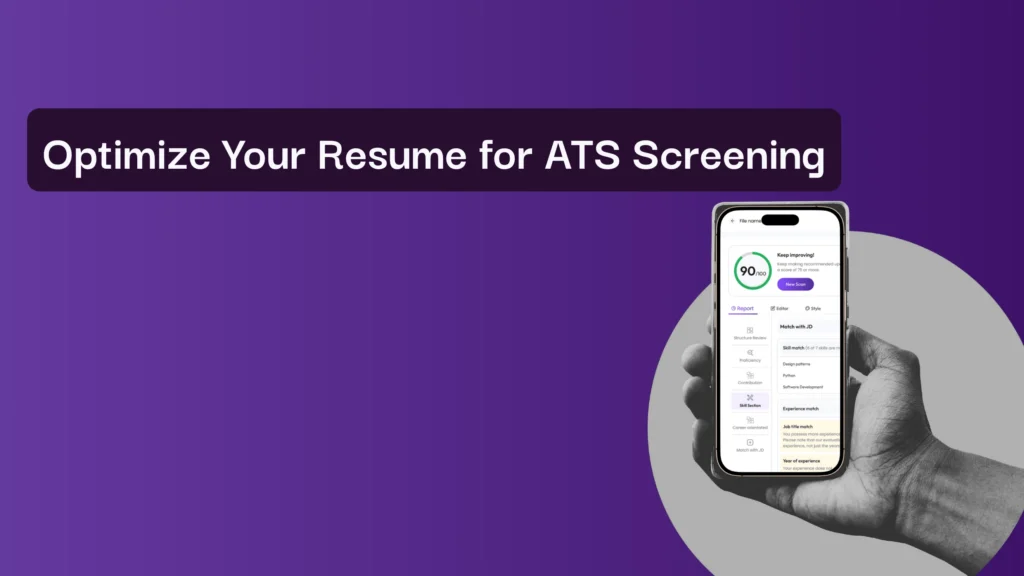
There are several tools that can simulate an ATS scan and show you how your resume scores against a specific job description. Avua’s AI Resume Score Checker is one such tool that gives you a clear picture of what the bot sees, highlighting missing keywords, formatting issues, and scoring gaps. These scanners aren’t perfect replicas of every ATS on the market, but they’re incredibly useful for catching obvious misses.
If you’re looking for a broader comparison of tools, our guide on the top tools to create an ATS-friendly resume is a great resource.
The “Plain Text” Test
Here’s a quick and dirty test that most people never think to do: save your resume as a .txt file. Open it. If your content comes through clean, readable, and in the right order — congratulations, your formatting is ATS-safe. If it’s garbled, jumbled, or missing entire sections, you’ve got a formatting problem that needs fixing before you apply to another job.
Conclusion: Building a Dynamic Asset
Let’s zoom out for a moment. Your resume isn’t a static document you create once and forget about. It’s a living asset, one that should evolve with every application you submit.
Here’s why: no two job descriptions are identical. Even for the same role at different companies, the specific keywords, priorities, and terminology will vary. The job seekers who land the most interviews are the ones who take ten minutes before every application to tweak their resume, adjusting keywords, reordering skills, and tailoring bullet points to match the specific language of the posting.
Before you hit submit on your next application, run through this quick checklist:
- Keyword Alignment: Have you pulled the most important keywords directly from the job description and woven them naturally into your resume?
- Both Versions: Have you included both the full term and the acronym for every technical skill, certification, and methodology?
- Context Over Lists: Is every keyword backed by a sentence that shows how you used that skill and what result it produced?
- Clean Formatting: Is your resume in a single-column layout, free of graphics and tables, using standard fonts and bullet characters?
- Testing: Have you run your resume through a scanner or the plain-text test to confirm it parses correctly?
If you can check all five boxes, you’re in great shape.
At the end of the day, an ATS-friendly resume isn’t some mysterious, robotic document stripped of personality. It’s simply a clear, well-organized professional story — told in the language your industry speaks. When you optimize your keywords strategically, you’re not tricking a machine. You’re making it easier for the right people to find you.
And that’s the whole point, isn’t it?
If you want to take your resume strategy even further, explore how AI resume tools can accelerate this entire process, helping you identify keyword gaps and optimize your content in a fraction of the time.
FAQs
1. What are keywords in an ATS-friendly resume?
Keywords are role-specific skills, tools, qualifications, and phrases pulled directly from the job description that ATS software uses to rank resumes.
2. How many keywords should I include in my resume?
There’s no fixed number. Focus on including all critical and frequently repeated keywords naturally, with context, rather than forcing repetition.
3. Where should keywords be placed for maximum ATS impact?
Prioritize the professional summary, skills section, and experience bullets, ensuring keywords are supported by clear results and achievements.
4. Can keyword stuffing improve my ATS score?
No. Keyword stuffing can hurt your chances—modern ATS systems detect it, and recruiters quickly reject resumes that feel unnatural or spammy.
5. How can I test if my resume is ATS-friendly before applying?
Use resume scanners and plain-text tests. Tools like avua help identify missing keywords, formatting issues, and overall ATS match scores.