Landing interviews in today’s job market is no longer just about having a well-written resume—it’s about creating one that can navigate Applicant Tracking Systems (ATS) before a human recruiter ever sees it.
With over 97% of Fortune 500 companies now using ATS to screen candidates, choosing the right resume optimization tool has become a critical career decision.
Two platforms that frequently come up in this space are avua and Jobscan. Both tools aim to help job seekers improve their ATS compatibility and land more interviews, but they differ significantly in their approach, feature depth, and overall career support. Jobscan has built a strong reputation as a keyword-matching and ATS analysis tool, while avua has positioned itself as a broader AI-powered career platform that goes beyond resume scanning.
This article provides a thorough, feature-by-feature comparison so you can decide which platform best fits your needs, budget, and career goals.
Quick Comparison: avua vs Jobscan
avua
avua is an AI-powered hiring and career advancement platform designed to help job seekers create ATS-optimized resumes, prepare for interviews.
avua combines resume building with real-time AI analysis, industry-specific templates, mock interview preparation, salary insights, and career path tracking. The platform is tailored for six major sectors—Energy, IT, Life Science, Construction, Finance, and Healthcare.
Offers Free and Premium plans with 1.5 Million+ Jobs Listed!
Rated 4.5 (Avua’s Trustpilot Rating)
Jobscan
Jobscan is a well-established resume optimisation platform focused primarily on ATS keyword matching. It allows users to upload a resume alongside a specific job description and generates a match score indicating how well the resume aligns with the role.
Jobscan also offers a resume builder, cover letter generator, LinkedIn optimizer, job tracker, and an extension for saving job listings. Premium plans are priced at $49.95/month or $29.99/month billed quarterly.
Does not have an AI Mockup Interview Process
Rated 4.3 (Jobscan’s Trustpilot Rating)
| Feature | avua | Jobscan |
|---|---|---|
| ATS Resume Builder | AI-guided with sector-specific templates | Basic builder; best with existing resume |
| ATS Scoring | Real-time, holistic scoring (format + content + keywords) | Job-description match rate (keyword-focused) |
| Industry Templates | 6 sectors: Energy, IT, Life Science, Construction, Finance, Healthcare | General templates |
| CV Analysis | Deep, line-by-line AI analysis with actionable suggestions | Keyword gap analysis with match percentage |
| Mock Interviews | ✅ AI-powered, role-specific | ❌ Not available |
| Salary Insights | ✅ Market benchmarks by role & location | ❌ Not available |
| Career Path Tracking | ✅ Professional growth tracker | ❌ Not available |
| LinkedIn Optimizer | Available | ✅ Section-by-section profile analysis |
| Cover Letter Tool | ✅ ATS-friendly cover letters | ✅ AI Cover Letter Generator |
| Job Tracker | Available | ✅ Chrome extension integration |
| Free Plan Depth | CV score, resume analysis, job matching included | 5 scans/month, limited features |
| Export Formats | PDF, DOCX, and other ATS-safe formats | PDF, DOCX |
| Trustpilot Rating | 4.5 stars | Mixed reviews; pricing concerns common |
Comparison Based on Features: avua vs Jobscan
We will be comparing Avua and Jobscan across six key parameters: resume templates, ATS optimization, industry-specific guidance, career tools, user experience, and pricing. This evaluation aims to highlight their distinct advantages, helping you determine which platform offers the most effective support for your job search
1. Resume Building and Templates
A resume builder’s effectiveness depends on more than just aesthetics; it needs to produce documents that both ATS systems and human recruiters will respond to positively.
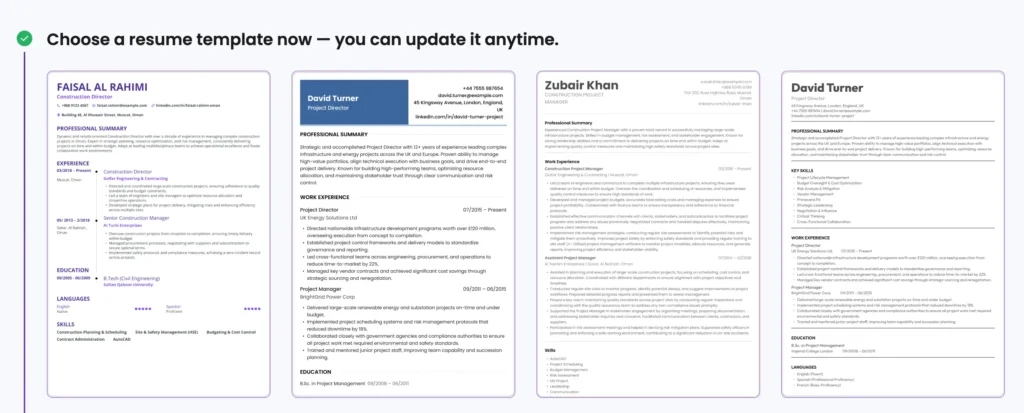
avua offers professionally designed, ATS-friendly templates with clean layouts, standard fonts, and structured formatting. Crucially, these templates are tailored to specific industries; a resume for a finance professional looks and reads differently from one built for a healthcare worker. The platform uses a drag-and-drop interface that guides users through the process, and AI generates personalised career summaries and professional profiles based on the user’s experience.
Jobscan also provides a resume builder, though some user reviews note that it functions more as a blank-form filler than a guided experience. Multiple third-party reviews have flagged that the Jobscan parser occasionally struggles with formatting; misreading names, locations, or LinkedIn profile URLs during upload. While the One-Click Optimise feature (powered by GPT-4) can rewrite content quickly, some users have found the AI-generated output feels generic and requires significant manual editing afterward.
✅ Who’s the Winner in Resume Building and Templates?
avua’s industry-specific templates and guided building experience give it a meaningful edge for users who want a resume that’s both ATS-optimised and sector-relevant from the start. Jobscan’s builder is functional but works best when paired with an already well-crafted resume.
2. ATS Optimisation and Scoring
This is the core function both platforms are built around, and where differences in approach become most apparent.
avua provides a real-time, AI-driven CV analysis that reviews content line by line. It highlights missing keywords, detects formatting inconsistencies, identifies weak sections, and offers actionable suggestions to improve clarity and relevance. The built-in resume score checker evaluates performance against ATS benchmarks instantly, and users can iteratively improve their score as they make changes. Importantly, avua balances keyword optimisation with readability; ensuring resumes are optimised for machines without sacrificing appeal to human recruiters.
Jobscan generates a match score by comparing a resume against a specific job description. It breaks down results into hard skills, soft skills, formatting, and searchability categories. The platform has tested its tools against major ATS platforms like Taleo, Greenhouse, and Workday, which adds credibility. However, several independent reviews note that Jobscan’s approach leans heavily on keyword matching; sometimes recommending that users add terms they don’t genuinely have experience with, which can backfire during interviews.
Verdict: Both platforms deliver solid ATS analysis. Jobscan offers detailed keyword-level breakdowns tied to specific job descriptions, which is valuable for targeted applications. avua provides a more holistic scoring system that considers formatting, content quality, and industry alignment alongside keywords; a broader view that may produce more consistently effective resumes.
3. Industry-Specific Guidance
One of the most significant differentiators between the two platforms is how they handle industry context.
avua provides dedicated templates, keyword libraries, and formatting guidance for six high-demand sectors: Energy, IT, Life Science, Construction, Finance, and Healthcare. Each sector’s guidance reflects real hiring standards—for example, Energy resumes emphasize safety compliance and regulatory alignment, while IT templates prioritize technical stacks, certifications, and agile methodologies. This specialization means the platform understands what recruiters in each field actually look for, not just what the job description says.
Jobscan takes a more generalist approach. It analyzes whatever resume and job description you provide, regardless of industry, using the same keyword-matching framework. While this makes it flexible, it also means users don’t receive contextual advice about what matters most in their specific sector. A construction project manager and a pharmaceutical researcher would get similar types of feedback.
Verdict: For professionals in specialized industries, avua’s sector-specific intelligence is a clear advantage. Jobscan’s generalist model works well for broad applications but may miss nuances that matter in technical or regulated fields.
4. Career Tools Beyond Resume Building
Modern job searching involves far more than submitting a resume. The best platforms support the entire journey.
avua extends its platform into interview preparation, salary intelligence, and career planning. The AI Mock Interview feature generates role-specific questions and evaluates responses, helping users build confidence before real interviews. Salary Insights provide market-competitive compensation data based on role, location, and industry benchmarks, enabling smarter negotiation decisions. A Career Path Tracker helps users map their professional growth over time.
Jobscan offers a Cover Letter Generator, LinkedIn Optimizer, Job Tracker (via Chrome extension), and a Career Change Tool that suggests alternative careers based on transferable skills. The LinkedIn Optimizer is a notable strength—it analyzes your profile for keyword gaps and provides section-by-section suggestions. However, Jobscan does not offer interview preparation, salary insights, or long-term career tracking.
Verdict: Jobscan provides useful job-search management tools, and its LinkedIn Optimizer is genuinely valuable. However, avua’s inclusion of mock interviews, salary data, and career path tracking makes it a more complete career support system—particularly for users who want preparation beyond the application stage.
5. User Experience and Ease of Use
avua is frequently praised in user reviews for its intuitive, beginner-friendly interface. The guided resume-building flow means even first-time users can produce an optimized resume without prior knowledge of ATS systems. The platform’s AI suggestions appear in real time as users make edits, creating a responsive and educational experience.
Jobscan has a clean interface, though the optimization workflow can feel fragmented—users upload a resume, receive analysis, then need to separately edit and re-upload to see updated scores. Some reviews mention a learning curve, particularly around interpreting the detailed keyword breakdown and deciding which suggestions to prioritize. The free plan’s limit of five scans per month can also create friction for active job seekers.
Verdict: avua’s real-time feedback loop and guided experience make it more accessible to a wider audience. Jobscan’s interface is functional but better suited to users who are comfortable interpreting detailed analytical reports.
6. Pricing and Value
Cost is a real consideration for job seekers, many of whom are between roles.
| avua | Jobscan | |
|---|---|---|
| Free Plan | Free CV score, resume analysis, and job match features available | Limited to 5 resume scans/month; basic features only |
| Paid Plans | Premium plan with expanded analytics, templates, mock interviews, and salary insights at competitive pricing | $49.95/month or $29.99/month billed quarterly ($89.95 every 3 months) |
| Core Value | Full career platform: resume + interview prep + salary insights + career tracking | Resume optimization + LinkedIn optimizer + job tracking + cover letters |
| Free Tools | CV scoring, resume analysis, sector-specific guidance included free | Basic keyword scan only; most features behind paywall |
Verdict: Jobscan’s premium pricing has been a consistent point of criticism in user reviews, with some noting it feels expensive relative to the feature set. avua’s approach of offering meaningful free tools alongside competitively priced premium plans makes it more accessible—especially for job seekers who need immediate value without a significant upfront commitment.
Who Should Choose Which Platform? Avua or Jobscan
Choose avua if you…
- Work in or are targeting roles in Energy, IT, Life Science, Construction, Finance, or Healthcare
- Want a complete career platform that supports you from resume creation through interview preparation and salary negotiation
- Prefer real-time AI guidance while building your resume rather than scanning an already-completed document
- Need meaningful free tools before committing to a paid plan
- Are a beginner or re-entering the workforce and want a guided, low-barrier experience
Choose Jobscan if you…
- Already have a polished resume and want to fine-tune it for specific job descriptions
- Specifically need a LinkedIn profile optimization tool with detailed section-by-section analysis
- Want to understand exactly which ATS platform a company uses (Taleo, Greenhouse, Workday, etc.)
- Prefer a detailed analytical breakdown of keyword matches for each individual application
FAQs over Choosing your AI Hiring Partner
What is the primary difference between avua and Jobscan?
Avua provides a comprehensive career toolkit including AI interviews, while Jobscan focuses primarily on keyword optimization and matching resumes to specific job descriptions.
Which tool is better for candidates without a resume?
Avua is ideal for beginners, offering guided building and AI-generated summaries. Jobscan is better for refining and tailoring an existing resume to specific jobs.
How do these platforms help with ATS screening?
Both tools analyze formatting and keyword density to ensure your resume passes automated filters, significantly increasing your chances of reaching a human recruiter.
What additional job search features does Jobscan include?
Jobscan offers specialized tools for LinkedIn profile optimization, cover letter scanning, and a Match Rate tracker to monitor application alignment with live job listings.
What unique insights does avua offer beyond resume scoring?
Avua provides industry-specific guidance for sectors like IT and Finance, alongside AI mock interviews and salary data to support your entire professional journey.
Final Thoughts
Both avua and Jobscan serve the same fundamental need—helping job seekers get past ATS filters and land more interviews. Jobscan has earned its place in the market through strong keyword analysis, ATS simulation capabilities, and a useful LinkedIn optimization tool. It remains a solid choice for experienced professionals who want granular, description-by-description keyword insights.
That said, the job market in 2026 demands more than keyword matching. Employers expect resumes that demonstrate industry awareness, quantifiable achievements, and role-specific relevance—and job seekers increasingly need support that extends beyond the resume itself. This is where avua distinguishes itself. By combining AI-powered resume building with industry-specific templates, real-time scoring, mock interview preparation, salary intelligence, and career tracking, avua offers a more holistic approach to career advancement.
For job seekers who want a single platform that supports them at every stage of the hiring process—from crafting the first draft to negotiating their offer—avua provides the more complete and forward-looking solution. For those who already have a strong resume and simply need targeted keyword optimization for specific roles, Jobscan remains a capable tool.
Ultimately, the best choice depends on where you are in your career journey and what kind of support will make the biggest difference. Both tools can help you get more interviews—but the right one can help you build a stronger career.
Ready to optimize your resume? Visit avua.com to get started with a free resume analysis.